Showing posts with label programming. Show all posts

Wednesday, June 17, 2009

The Planet of Swears

I'm writing some RSS feed scraper programs and while playing around with that, set up an install of Planet feed reader. It was very funny to see on the one hand, lots of people blogging or writing things like "Oh, this doesn't even need setup, just unzip it and you're basically done" -- and the Planet documentation itself saying that the config file's comments explained everything -- vs. actual step by step instructions of what to do, like burningbird's post, which I found very helpful. That's a lot of "nothing to do" to explain and it still didn't get far enough for what I'd like to figure out: how to set up one installation of Planet but also set up multiple feeds in different directories, each with their own template.

Meanwhile I'm very amused that for another project I get to write a spider with a curse word filter. I haven't had that hilarious of results since writing porn filters for Excite's web spider. My output files and screen output when swear-spider.py runs are very funny. "Asshole Detected!"

A quick search on lists of dirty words gets some very amusing Supreme Court hearing transcripts. Like so!

FCC v. Pacifica Foundation, 438 U.S. 726 (1978), Decided July 3, 1978. The dissenting opinions are especially great!

"A word is not a crystal, transparent and unchanged, it is the skin of a living thought and may vary greatly in color and content according to the circumstances and the time in which it is used."
I'll try quoting that to my kid next time he frown at my liberal use of what he carefully calls "the f word".

Digg this

Tuesday, March 24, 2009

Ada Lovelace Day

I felt a little wistful as I thought over who to write about. I wished for a clear mentor or hero who I would have known about from childhood onward. Not many of us had that kind of computer science hero or even a childhood or teenage computer geek peer.

I admire the many women I know (or know of) who start organizations to give community and support to women programmers and geeks. People I admire from afar in Linuxchix: Val Anita Aurora for her excellent writing, Akkana Peck because I'm always stealing bits of her .bashrc file and I admire how she posts useful tidbits like that, Sulamita Garcia, Miriam Ruiz for being a developer also outspoken about sexism and misogyny. Desi from Devchix who not only is a leader in a great organization for women but who is such a good evangelist and teacher for Ruby on Rails (almost enough to tempt me away from Python and php). Angela Byron aka webchick who is so helpful and a great teacher for being involved with Drupal, too. All the women on linuxchix, ubuntuwomen, phpwomen, devchix, and Systers: you are my heroes!

Of developers I know, well, I don't know that many. My co-worker Kirsten aka Perlgoddess, Kaity aka ubergeekchick (uberchicgeekchick on github) who writes and podcasts so thoughtfully about development and creativity, and skud aka Kirrily Robert who is a developer, a great blogger and good friend. My co-workers at BlogHer, Julie Douglas who taught herself php and Drupal, and Skye Kilaen who works with me on blog templates and problems (can debug a legacy Moveable Type template like nobody's business!) and who runs All Access Blogging, which gives detailed step by step information on how to make various blogging platforms accessible to people with visual impairments. And my sister Laura, who as well as being a hilarious and fierce personal blogger who can express any emotion simply from inflecting the word "dude", inspired me through sharing her 10 years of professional experience as a web developer in SEO, and by having more O'Reilly books about HTML, CSS, Java, and Javascript than I do, enough to make California slide off into the sea, and tackling the ever-shifting landscape of web dev head on no matter how much it makes a person just want to scream. And last but not least my fellow conspirator and BFF, Laura Quilter, whose expertise I depend on, running the back end of feministsf.org server, blog, mailing lists, and wikis.

Of other techy women I have worked with I would like to say a few things about women who either worked or learned from me. I look up to them too. Jasmine Davila, Olivia Given, Lark Baum all worked with me at the University of Chicago Lab Schools, doing web stuff, tech support on about 400 classroom and office Macs, twiddling with the servers, installing the physical wiring in tiny basement network closets and crawling through the ceilings wearing our headlamps, Flukes, and walkie talkies. They were so awesome. We all learned it on the fly, without any big attitude that we had to have a big attitude. We were not always pretending omniscience in a field where the range of things to know changes daily. We approached what we had to do as stuff to learn. That still inspires me a lot! I include in this category my mom, Karen Henry, who began asking me questions about the Internet in about 1994 and who ended up teaching classes on email, gopher, databases, and the early Web as a business and science reference librarian at the Houston Public Library.

Obviously I love and admire social media leaders and thinkers like Tara Hunt, all the women of She's Geeky and BlogHer, but there are too many to list! All my co-workers, the bloggers on our site and in our network, all the social media experts and technophiles, I am honored to get to be part of these networks of thousands of women. And to all the relentlessly intelligent bloggers I know from blogging, feminism, and science fiction fandom like Tempest, Jen Cole and Aleja Ospina, Karen Healy (Girls Read Comics) and Robyn Fleming (Cerise and The Iris Gaming Network), Strata Chalup, SJ from I, Asshole, Sarah Dopp, and Debbie Notkin, thank you for putting your words out there.

For anyone who has ever sat down with me to hack on some code or who has made any sort of public technical blog post with code in it, I feel a deep sense of sisterhood and am very, very happy to know you. It is both sad and inspiring but every woman I have ever spoken to in person about coding, even the people I think of as light years ahead of me in knowledge and experience, has expressed feeling like they are not hackery enough to really "count". As if in every thing we do has we have to prove our perfect technical competence for the honor of all womanhood. I try to fight this feeling in myself. Let's keep fighting it and put more of our work out there even if it's not "good enough" or done. And let's keep supporting each other's work and using peer mentoring and pair programming as much as we can!

(post for Ada Lovelace Day pledge organized by Suw Charman. Thanks Suw!)

Digg this

Tuesday, February 03, 2009

Programming languages and science fiction!

Cat Valente, Tiptree-winning author of The Orphan's Tales, wrote up a brilliant comparison of programming languages to literary genres. She covers a lot of ground here as a cultural and critic, and she's witty as hell. If the bits I'm quoting make you laugh, go read the whole thing!

Smalltalk is mythpunk, Python is speculative fiction, Java is...

Divorce in the suburbs, cancer of the miscarriage, and how God will punish you for having sex. That's right, it's the big, predictable Literary Fiction Gorilla, coming to destroy a gated community near you. Java is the mainstream of the mainstream, it gets all the critical hand jobs, they teach it at universities, and the support base is vast...

PHP is journalism, Perl is poetry, Ruby is steampunk, ASP is given a snarky kick to the head that keeps making me laugh!
It mixes all the worst parts of the other genres/languages. Hey! Serial killers are awesome! What about a vampire serial killer? What about a vampire werewolf serial killer with a heart of gold? What about a vampire werewolf serial killer with a heart of gold who mixes row result processing, business logic, and layout code ALL ON ONE PAGE??!

Sold, to your corporate overlords. After all, if you put the strength of an entire company behind it, it'll be a success, even if it leaks memory and ends with and then I woke up.

The feel and culture (and reputation) of each programming language are well described and it takes some complicated snark to link them all to equally well described literary genres and subgenres. Geek culture is AWESOME.

I can't imagine a more perfect post for this blog to link to! Thanks, Catherynne!

Digg this

Friday, January 30, 2009

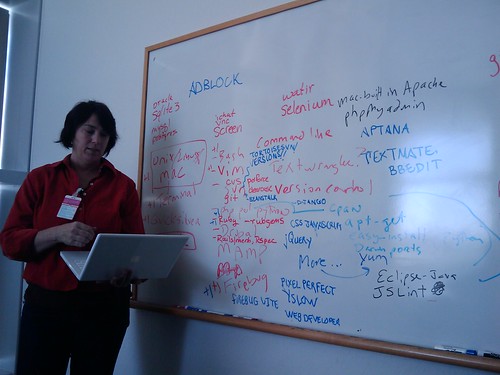
She's Geeky - Show and Tell Your Dev Env session

We had a session to talk about what tools, languages, and platforms we use for software and web development.

She's Geeky

I started off by trying to list all the tools I use for work for development. Then other people stood up one by one to add their tools to the list on the whiteboard. Lots of people had questions. Our group ranged from people who have been developers for decades to people who had been programmers, but left the field and come back again, to people who weren't sure if they were developers at all because they do web stuff.

I felt like something came together at the end when someone said that she was leaving a huge company with the budget to buy development tools and was now going to work for a startup, so she came to She's Geeky to figure out what free and open source tools were out there for her to use. I forgot to mention SCALE and OSCON, but I should have.

There was a core of people using unix/linux and (oddly?) Mac but unix-centric. There were some Windows folks but was unclear

Version control: People were interested in svn clients and in github. No one currently used CVS and almost no one had heard of mercurial.

Here is the giant, unorganized list of tools mentioned.


unix / linux
macos
terminal
quicksilver
xcode
ichat vnc screen
bash
vim
svn
git (github is nifty)
cvs
php
perl
python
drupal
sourceforge
github
durpal
mamp
firebug
command line...
textwrangler
textmate
clearcase
perforce version control
ruby
rails for web framework / merb
apache with passenger - for deploying rails apps locally
mongrel server to run web apps and it's really easy. (use with rails) ruby gem
webbrick rails thing - use to be built in rails server now it's mongrel
what is a ruby gem install?
rspec
selenium - browser based scripting
watir - testing tool - ruby
"Everything I know is ruby, I've tried to forget my Java life"
eclips intellij
bbedit / textmate
textmate has plugins
php, ruby, html/ css/javascript
Firebug. I love firebug. i am dead in the water without it.
firebug lite you can use on non firefox browsers.
We need a whole session on firefox plugins
Yslow, pixelperfect, firebug, web developer toolbar
enthusiastic recs for pixelperfect.
ADBLOCK!!
Melanie explains history of Yslow.
(Firefox accessibility checker, can't remember its name)
subversion client: beanstalk
Versions - mac svn client!
Tortoise - windows svn client beautiful interface that makes sense.
frameworks: jquery uses css format for javascript and it is awesome
Django (python)
Apptana. IDE. mixed feelings. baby aspirin flavor of eclipse. painful horribly slow but love the real time syntax checker
vmware fusion. really cool for multiple dev for mac. it can be a little slow. My mac is 2GHz processor 2GB memory but it's almost not enough any more to run the VM
Amazon ec2
Apache comes with your Mac, just turn it on in the preferences.
phpmyadmin
jslint. douglas crawford's book Javascript: the good parts (unison from room)
he wrote jslint, javascript interpreter.
Wireshark - monitor your network
adobe cs3 design packages, fun! flash dev. get student discount. adobe 4 is out!
instant rails for windows.
hivelogic.com help installing mysql on a mac.
IRC: use irc for the tool/language. Colloquy - good irc client for Mac (no one used it on Windows)
basecamp, campfire. Propane.
Scrummy - open source good for task tracking, agile
pivotal tracker - a useful communication tool. tracking stories. move through dev cycle. it's free.
Drupal firefox plugin!!! must have this! helps with debugging!
Kindle - good for tech manuals
The Public Library. good for tech manuals too.
westciv stylemaster css editor westciv.com
coda panic software Transmit ftp client. integrated web dev env called Coda which is really fascinating.
Apple trainers doing technical mac os books. they use subetha edit.
omnigraffle mindmeister
different open apis that are super useful.
cpan, darwinports, apt-get, easyinstall, etc etc


People:
* Desi Mcadam - ruby, ruby on rails, web based applications, spotus, hashracket , consultant. florida. Devchix!
* Karen Mcadams - Freelancer. Likes to work for non profits.
* Jenny Greenwood - jobs dev drupal software engineer C, C++, assembly. out of developtment for 8 or 9 years. teaching self CMSes and drupal and css and php
* Margaret rosas - quiddities , santa cruz - doing drupal. knight foundation. drupal radio. Radio Engage. local public radio station she built Santa Cruz Geeks site. met heathervescent and started doing santa cruz geek dinners.
* becca (berkeleybecca) peachpit press. what software tools we have energy around. ones we just love. she is lurking here to find out what we love. she is proud of coding her personal web site and taught herself css.
* Laura - - front end middle end web dev for 10 years. not working now, volunteering to do web sites. does bazarre bizarre. javascript, java, html css.
* nabil project manager. security. peeve of security. personal information in web sites! finds out horrible details! company is hiring, little consultancy, sf, biz process mgmt development, hiring microsoft engineer, a software developer. elegrity. elegant + integrity.
* Amie Forest - Quiddities
* Terri Train IT manager. web dev typing in html javascript by hand, dreamweaver, i like it by hand better elegant code. lotus domino. not free. good quick app development tool for doing all sorts of workflow , web forms, apps on the web. switching to a new company, come to this come to new company with fresh ideas, won't have money to buy expensive tools, looking for free ware now.
* melanie archer - front end web developer javascript css freelancer.

I was taking notes very fast and might have left out people or crucial details - please correct me in comments (or email!)

A lot of us also agreed it would be nice to put up a board to match up people who use various of these tools or platforms or languages, so that we can have an IM buddy, where it might be easier to ask questions rather than go on IRC. I do try to nerve myself to ask stuff on IRC ... and thank you to anyone on php-women and drupal-support who helped me out 8-) I found that pretty quickly I was able to be helpful to random other people in drupal-support, which made me feel easier in my mind about asking my own questions.

Thank you everybody! I got a lot of good tips from this session and also a nice sense of not being alone in trying to get a handle on the amorphous beast that is a development environment.

We agreed that we could pick any of these tools or concepts and do an entire sesson on it that is more in depth and hands on. general agreement that we need a Firefox plugins for developers session, asap.

Digg this

Wednesday, January 28, 2009

Cleaning up urls with awk

Here's my stupid awk trick of the day: using the field separator option to mess with URLs. I spent something like an hour trying to write regular expressions and then reading other people's solutions to cleaning up urls from log files and other sources.

For example, given a list of about a million urls like this:

http://bloggggggggy.com/path/to/the/post/2009/1/26/blahblahblah.html
http://www.bloggggggggy.com/morejunk.html
https://www.bloggggggggy.com
http://yetanotherblogomigod.blogspot.com/
http://yetanotherblogomigod.blogspot.com/somejunk.php?stuff&morestuff

I want to end up with a list that's just

bloggggggy.com
yetanotherblogomigod.blogspot.com

You can do this in php with some regular expressions:

preg_match("/^(http:\/\/)?([^\/]+)/i", $URLstring, $result);
$domain = $result[2];

(Though I saw a lot of other solutions that were much longer and more involved)
or, here's one method in Perl:

$url =~ s!^https?://(?:www\.)?!!i;
$url =~ s!/.*!!;
$url =~ s/[\?\#\:].*//;

But for some reason I was trying to do it in one line in awk, because that's how my brain is working these days, and I couldn't get the regular expression right.

Suddenly I realized that if I split the lines on "/", the domain name would always be the third field.

So,

awk -F"/" '{print $3}' hugelistofurls.txt > cleanlist.txt

gave me a nicer list of urls.

and

awk -F"/" '{print $1,"//",$3} hugelistofurls.txt | sort | uniq -c | sort -nr > counted-sorted-cleanlist.txt


gave me just about what I wanted.

After I did that and finished squeaking with happiness and wishing I could show someone who would care (which unfortunately I couldn't which is why I'm blogging it now) I realized I wanted the www stuff taken out. So I backed up and did it in two steps,


awk -F"/" '{print $1,"//",$3}' hugelistofurls.txt > cleanlistofurls.txt
awk -F"www." '{print $1 $2}' cleanlistofurls.txt | sort | uniq -c | sort -nr > reallyclean-sorted-listofurls.txt


which gave me something like this:


3 http://blogggggggy.com
2 http://yetanotherblogomigod.blogspot.com


Exactly what I wanted!

While I appreciate a nice regular expression and it can be a fun challenge to figure them out, getting the job done with awk felt a lot simpler, and I'm more likely to remember how to do it in an off-the-cuff way, next time I have a giant list of urls to wrestle with.

How would you approach this same problem, either in awk or using another tool or language? Do you think one way or another is superior, and why?

Digg this

Wednesday, January 14, 2009

Upgrading Drupal 4.7 to 5.14

I have been working on upgrading a site from Drupal 4.7, which is unsupported, to Drupal 5.14. I am somewhat familiar with Drupal as a blogger, user, and administrator, but wasn't sure what it would take to upgrade a large and complicated site that's been around for several years (and several former admins and programmers).

I decided to copy the entire site over to my computer so that I could run and upgrade it on a machine I completely control. I had already installed MAMP. If you develop on a Mac I advise you not to be snobby, MAMP is awesome.

The instructions at drupal.org looked pretty good. And Angela Byron from Lullabot has a good screencast on upgrading from Drupal 4.7 to 5.1x. If you are about do an upgrade, I recommend you watch this -- it helped me get all the steps clear in my mind and it was also kind of reassuring.

One of the first things I did was to list out all the modules used in the old site. Later, I dumped them into a shared document so I could ask other people which modules they know are used or might be useful to bring to the upgraded site. I also started a plain text log file of what I was doing for the upgrade, to record things that worked and didn't, links that were useful, commands, and so on. This sort of "work in progress" file gets messy very fast, so it's good to go back over it before you stop working for the day to sum up what actually did, or does, work!

I started off here, Copying a site to a local MAMP installation on a Mac. I ran into a few problems and when I figured them out, I logged in to drupal.org so I could add to the documentation.

Then I ran into problems, because I wanted to run several instances of Drupal at once, and there were hard-coded bits of urls in several blocks of the 4.7 site. So I had a copy of the complete 4.7 site in a directory called "drupal". Its .htaccess file was set up as in the "Copying a site to a local installation" instructions suggested. But half the links were broken - the ones that were hand-coded into blocks rather than pulling from the database. What I ended up with was another .htaccess file in the root MAMP/htdocs directory:

RewriteEngine on

RewriteRule ^$ /drupal/index.php?q=/ [L,QSA]

RewriteCond %{REQUEST_FILENAME} !-f
RewriteCond %{REQUEST_FILENAME} !-d
RewriteRule ^(.*)$ /drupal/index.php?q=$1 [L,QSA]


This worked. Now I have several folders with different versions of Drupal and several sites in my MAMP/htdocs folder, and to get them fully operational with all the links working, I change the path in the RewriteRule in .htaccess in htdocs.

Other people, in dealing with this problem, turn to virtual hosts, which is what we use in our production server. I haven't tried setting that up yet, though it seems like once it was working, it would be more elegant.

Onward to the upgrade itself. I tried it a few times, and kept getting various bits wrong, ending up with a blank white screen and no information in the MAMP/conf/apache_error_log and nothing at all in "view source". HEre's some of the things I did wrong the first few times:

- ran upgrade.php from the old site's directory. oops! Drop that database and start over!

- put the old site into maintenance mode, then couldn't get to a login screen for turning maintenance mode off again, despite advice from the Drupal forums on "Site off-line under maintenance mode" to go to

http://localhost:8888/mynewdrupalinstall/?q=user 
. I ended up turning off maintenance mode from the command line,

/Applications/MAMP/Library/bin/mysql -u root -p databasename
>> update drupal.variable set site_offline=1

That worked great.

Turning things on and off from the mysql command line turned out to be very helpful for a bunch of my problems. It was useful for manipulating themes. When I enabled the site's old 4.7 custom theme -- not even selecting it as the default theme, just enabling it -- my entire new install gave me a blank white screen. Oblomovka suggested switching the directories around, which seemed like a great idea! So,

mv oldcustomtheme screwedupoldcustomtheme
cp bluemarine oldcustomtheme

We both thought this was clever and would trick Drupal 5.14 into going right back to the default bluemarine theme. No! It didn't work! The white screen persisted.

This was helpful: Unusable theme - How To reset your theme via the database.

In retrospect, I should not have tried enabling the old custom theme before I turned on some more modules; when I actually bothered to look at the old theme, I could see it used jstools and all sorts of other stuff that I'd deactivated.

I'm off to try that now. So far this has been pretty interesting, though sometimes frustrating! The documentation on drupal.org is extremely helpful.

Digg this

Wednesday, November 26, 2008

Growing a Language

I watched Guy Steele's 1998 talk Growing a Language last night. At the opening description and definition of "man" and "woman" I bristled up and wondered for quite some time if there would be a point to opening with gender or if it was just a throwaway joke about women and personhood. I tried to have faith something interesting was going on; luckily this faith was justified. Keep watching! (Or read the transcript if you're impatient.)


I think you know what a man is. A woman is more or less like a man, but not of the same sex. (This may seem like a strange thing for me to start with, but soon you will see why.)
Next, I shall say that a person is a woman or a man (young or old).
To keep things short, when I say “he” I mean “he or she,” and when I say “his” I mean “his or her.”
A machine is a thing that can do a task with no help, or not much help, from a person.


As I listened to Steele's use of language I became more and more hyperaware of words and their grammatical elements. This awareness built up slowly and had a great effect. I especially admired some of the poetic & beautiful bits in the middle:

But users will not now with glad cries glom on to a language that gives them no more than what Scheme or Pascal gave them. They need to paint bits, lines, and boxes on the screen in hues bright and wild; they need to talk to printers and servers through the net; they need to load code on the fly; they need their programs to work with other code they don’t trust; they need to run code in many threads and on many machines; they need to deal with text and sayings in all the world’s languages. A small programming language just won’t cut it.


How interesting that he could not begin to talk about anything, without defining gender! It's partly chance and the fact that he's using English; in Spanish for example he would have to take another approach to arrive at "person".

Digg this

Sunday, November 23, 2008

Lost my mind in PHP

The last few days I went a little nuts thinking about PHP and rewriting a very horrible messy script. I'd write something, make it work, write a little more, break the first bit, go back to look at the first bit and find that I couldn't understand my own code that I'd written the day before. I ended up throwing it out completely, waking up the next morning and writing the entire thing in a nice, neat, correct way. Within a day and a half, it worked, and is readable. The most important things that improved this sad blob of pointy-looking things and regular expressions were:

- decent formatting, without slacking off! Equal sign in vim, you're my pal.

- abstract things out into functions. Do it twice? think about making it a function.

- But don't always, if it's going to make a simple thing confusing. Keep it clear!

- Name the functions logically.

- Really think about naming variables so that the code makes sense when you read it.

I struggled with understanding what the hell I was doing in the first script because, I swear, everything was named $tag and $another_tag and $taglist and $tagfeed[] and $tag->tag until I was lost in a maze of taggy little passages, all alike. How very, very embarrassing! If you ever see that code, please burn it!

Now all the variables have very logical names so that everything makes sense. Doing that made me understand what I was actually trying to do -- much better than I had understood it before. Everything became clear and fell into place.

The php.net pages are truly awesome. I did struggle for silly amounts of time trying to figure out what the hell to do with strings. Like do I want egrep, preg_match, substr, strstr, or WHAT? (I usually end up with preg_match since I know perl regular expressions reasonably well.) But I appreciated php.net/function pages very much. The explanations make sense, there are examples, the lists of related functions often lead me to stuff I want to know, and the comments by other users *completely rock*.

Meanwhile, I read PHP Sucks, But It Doesn't Matter on codinghorror.com, and the entire crazy comment thread that is half computer science "real programmer" snobs, half even realer programmers rolling their eyes, and half people who know they are the 3rd half and who are Microsoft types (in other words, weird aliens from other universe). All I can say if any of these guys calls me a "script kiddie" I will enjoy kicking their teeth in!


Bike? I don't need your bike! I can kick your ass with these here training wheels! Snobs.

My thingamajig now reads tags in from de.licio.us, parses them, decides what kind of thing they are, pulls out different kinds of posts, and builds lists of post titles by subject grouping and source in a somewhat complicated way. Then it writes all those lists out to a jillion little static files which will be cached... everything will be so much faster and more polite to the delicious servers this way. Joy!

Digg this

Wednesday, November 12, 2008

De.licio.us API and SimpleXML

I spent some time today looking at the de.licio.us API and writing bits of php with SimpleXML. Both of them are very easy and clear to use. I tried a bunch of the examples in the de.licio.us api docs to think through what it was possible to do with the queries. I really like de.licio.us, and hope it... well, hope that it stays pure. It's so nice and clean, it makes sense, it's not all crapped up with junk all over the page or the interface. Maybe a little more since the redesign, but it was fairly restrained.

This article by Matt Biddulph shows how to do some interesting stuff with de.licio.us data using Python, libxml2, tagsoup, and the Redland RDF toolkit. Backing Up Delicious with PHP, mySQL, SimpleXML, and Ajax also looked like fun to try. That was all way too fancy for what I needed to do today, but I'm keeping it in mind for future tool-building or experimenting with my personal del.icio.us account.

I had an annoying and frustrating interlude of realizing I needed to download xcode onto my new hard drive, downloading it for like 2 hours, going off in the meantime to 2 other machines I have accounts on to see if I could do what I wanted there while waiting for xcode, doing half of it (had php5, did not have other stuff I needed!), realizing slowly that I was in an endless labyrinth of nowhere quite having all the tools or access that I needed, and going back to my laptop in disgust. Also, I'm on a Mac and out of sync with the several different linux servers I have accounts on, so am always switching environments and remembering things that need to be tweaked.

I wonder how much time other people spend fiddling with their development environment? Or having to set it all up again after some crash or computer loss? I've noticed that even the holiest sounding super-experienced people who act like they're perfect about these things still spend a good amount of time saying "Oh, wait..." as they flail around, hit dead ends, and so on. That makes me feel a bit better about what happened today, when my stupid xcode download finally finished, wouldn't install, puzzled me for another frustrating 20 minutes until I realized my laptop was running an older operating system than it was before my HD crash. Ran around looking for CDs to upgrade. Failed to find them. Dammit! Downloaded older version of xcode. Now everything works! Tomorrow I will make the php all nice and make it do what I want... then stuff it all into a Drupal module.

Digg this

Friday, November 07, 2008

Looking at Apache server logs

I poked around with Apache log files today, looking at the log file formats and thinking of ways to look at the data. While a nice log parsing tool like AWStat or maybe a slick one like Mint would be nice, I just wanted to look at the data without too much fuss. Also, it's not my server. So I wrote something to do what I wanted with grep and sort and uniq. A bit afterwards, I realized using awk would give me the fields I wanted from the file, and would be easier & faster than using grep or egrep.

So here's some useful links,

* Managing and parsing your Apache logs This is good and simple with some useful example scripts.

* Checking your system logs with awk This has some explanations of why awk is handier to use than grep for handling log files.

* I'm growing more and more fond of awk! Why didn't I know this before - I did everything with Perl, instead! *mad crush on awk*

It was fun doing this and made me want to install Apache and get it running so that I would know its ins and outs a bit better. But that will just have to wait until I finish digging into these log files... It is amazing what you can tell from them and what you can deduce, given a huge web site to sink your teeth into. Right now I'm thinking about bots and spiders, remembering the fun things I used to do with spam hunting, filtering, and watching the habits of users going through a big proxy server.

Digg this

Saturday, October 11, 2008

Liveblogging take two: BlogHer Boston

Our workshop was for Blogging Basics: personalize, polish, and promote your blog. Danielle Henderson, Alissa Kriteman, and Meghan Garnum joined me on the stage. Kristy got us in touch with Elliot, the hotel employee setting up the projector, who found all the stuff and the cables and hooked everything up. Also, NeoOffice worked like a charm! Around 100 people filled up the room. We took some goofy photos and were having fun chatting before the talk. Everyone in the room was so talkative and intense with their conversations that I had to say "SEX" into the microphone several times to get them to pay attention. After a brief intro and my pep talk about getting your hands dirty digging into your code, we each talked about our experience. Alissa, Danielle, and Megan were full of enthusiasm and confidence, knew their technical stuff, and were great speakers.

Alissa Kriteman is the host for Just for Women: Dating Relationships and Sex. She has a weekly audio podcast show about empowering women. Alissa has been blogging for about two years and is enthusiastic about her future in blogging on WordPress. Hey, Alissa is from SF! I could hang out with her and hack on blog stuff! Yay!

Danielle Henderson has been blogging for 6 years with a variety of hosting platforms. (Bio: Danielle Henderson is a 31-year old college sophomore and freelance writer. She's been a blogger for close to 6 years at Knotty Yarn, and still has no idea how or if that is applicable to common conversation. Her first book was published in 2004, and she was recently featured in Cringe: Teenage Diaries, Journals, Notes, Letters, Poems and Abandoned Rock Operas.)

Megan Garnhum has been blogging for nine years and has over ten years experience in marketing companies, media, software and online social networking. She also does blog design and consulting. (Bio: It was love at first blog for Megan, who began blogging back in 1999 and hasn't stopped for a breath since. A hobby at first, blogging has become a big part of Megan's life. She has taught herself how to create, build and manage blogs on all of the major blog platforms and now designs and provides blog and web consulting for individuals and businesses, through Webundance, her consulting company. )

I'm Liz Henry and am a producer and software developer at BlogHer. In addition to being a poet and literary translator, I've been writing online since before 1990 and blogging seriously since 2003. When I started blogging I didn't think anyone would ever read it. I was so wrong. I blog about my life and about many topics including feminist science fiction, technology, and social media.

We asked the audience who they were.

More than 2 years blogging? (About a third)
More than 1 blog? (Half the room)
Blogger or blogspot? (Most of the room)
Typepad? (5 or 6)
WordPress? (a third of the room)
Tumblr: 1
Twitter, Plurk: 10
LiveJournal: 2
Drupal: 2
MySpace: 2

We discussed those difference a little and dedicated to break groups by experience level.

People who ever have messed with their code beyond a minimum. 1/3 of the room.

I mentioned my experience doing tech support for the BlogHer ad network bloggers. Most of the requests for help with code, the bloggers put themselves down, call themselves idiots or dolts and explain how they don't know anything. It's okay, but it makes me a little sad and I want to help people learn the skills to be more confident, and approach computers and approach things they don't know with a different attitude, not feel bad about themselves. Try not to do automatic disclaimers or self-deprecation. Everyone needs debugging help. I do too. I am often able to walk people through difficulties, but sometimes I just get passwords and fix problems. So if I can persuade you all to feel confident about playing with your blog code I'm making my own job easier. *audience laughter*

Also, the more intimate you are with your blog...

Alissa: Ooo baby, intimate!

... the more intimate you are with your blog, the more closely you can make it be how you want, for self-expression or to better reflect your business purposes.

Pep talk. Examples of some virginal blogs that have never know the hand of woman. The default blogger.com blog. The default wordpress blog.

What would this "generic" blog template say about you to your readers and the rest of the world?


Here's a myspace blog, very blinged up. What people think is good design doesn't matter. What is your goal? Clarity, or obfuscation? This is good blog design, conveying a strong identity:


And clearly, this blogger dove fearlessly into hacking her blog's back end, to express herself.

Look at your code. Engage with it. Print it out, put it next to the pages it's making. Mark it up and draw on it. Figure out which bits are doing what.
Confusing code is annoying. (Slide of WTF CAT)


It is a good thing my slides are working because otherwise all of us up here were going to act out the LOLCATS. (Alissa and the others make the WTF cat face. We're a funny crew up here!)

Pastebin.com is very nice. Paste in your code, label what kind it is - html, php, etc. And it will give you a temporary url showing all that code nicely highlighted in color. You can send that url to someone over IM and get debugging advice. This is amazingly useful. Don't be embarrassed to ask someone else to look at your code and spot obvious mistakes. It's just like copyediting.

Indenting properly will make your code more readable, too.

It will start to make sense. You don't need to know everything, to hear blah blah blah STYLE="width 160" blah blah blah. (blah blah Ginger) Learn bits at a time, just the bits you need to fix.

Danielle: You should look at the documentation. WordPress, Typepad, Blogger help files are good.

Megan: Yes. Search within the typepad web site. Very helpful. It's how I learned everything.

Me: We're all self-taught; that's very interesting.

Back to my talk. View source on other people's blogs and find examples of things you'd like to do, cut and paste their code, copy and tweak it, it's how programmers learn stuff. Backup first, then experiment. Ride it like you stole it!

Onwards to the "Personalize, polish, and promote" part of the afternoon.

Who are you? Reflect it. Whether your identity is actually you with real name, or pseudonym. Contact info. About me sidebar box or page, or both. This is built in to most platforms. In Typepad you just check a box and fill out a form. Same in Blogger. In WordPress you can make a page for it. (Slide with examples of About Me info. Some are short, serious, funny, some long and detailed with every interest of the blogger listed.) Include links to, or content from, other places you "are" on the web.

Who are your readers? Reflect them too! Expose their identities to each other. Readers on a blog are aware of each other, sometimes become a community. Allow readers to link back to their own web presences, email addresses. They can have profiles on your blog. Avatars, icons, gravatars so they have a photo too in their comments.

Why do we care?
This is important not just for touchy feely reasons or SEO.
It is important in the history of literature and ideas. Women's diaries, letters. Intertextuality. Intellectual crosscurrents and crossfertilization. Your future biographer might like to know who your blogfriends were in 2004 vs. 2008. Or that you regularly read and commented on Pharyngula or Feministe -- or on BlogHer. Consider yourself as a writer and as part of history. Represent your connections. It is important in feminist or in women's history. (Slide with books of letters by Virginia Woolf to Vita Sackville-West, and letters of Francis Ellen Watkins Harper to friends and newspapers, and book covers like "800 years of Women's Letters". ) We are in a mass movement where women are writing in a public forum, being part of public discourse. It is new in the history of the world.


What are you writing?

You might set out to write on a particular topic. then shift over time. The life of a blog. identity, subjects change. Tag your stuff. Categorize it. Make your post titles relevant (if you care about that, and want things to be found. If you don't want it found by a casual searcher or reader, bury it. Top posting buries. Baroque digression buries. Multiple subjects in one post buries the content.

Self-discovery process to tag your content. I went through one of my blogs and tagged, maybe 300 posts. This took me a couple of evenings. It revealed what I was actually blogging vs. what I thought I was blogging. I thought I was writing about poetry and translation, and I was really blogging about politics, feminism, the internet, and social media. WordPress has a very nice plugin called Simple Tags that lets you machine-tag all your entries at once. You can batch tag in detail, then combine tags to get higher level categories.

Tag, tag, tag. Tag clouds! Delicious (murmur of agreement from audience.)

Megan: Make your links relevant. When you make a link, don't put it around the words "click here" or "link". You want to put it around "really great shoes", or whatever- some text that is related to the meaning of the link and the content of the page you're linking to.

Me: Your future biographers will thank you here, too. The text you choose to hyperlink is probably important so in any textual analysis it would be weighted as more important. Your future biographers don't want to know that you're blogging quite a lot about "click here". They want to know you blog all the time about really great shoes. Anyway, any meta information about your content is great!

How to do this stuff?

1) Look through all your blog's settings and options. There may be built-in “About Me” or Recent Comments options.

2) Javascript widgets!
* Copy or download scripts from other people.

Blogger: Widgets, Gadgets
* Search for interesting widgets or code snippets
* Copy and paste into the “Javascript/HTML” box.

WordPress: Plugins
* Download/upload to your server
* Unzip the files
* Activate them in the wp-admin panel

Typepad: Typelists (basic templates)
* Create a “Notes” Typelist. paste in code
* Select content – check off a box to include
* Order content – drag and drop sidebar widgets

Hack with your friends!!! Thinking about gender, it is my observation that men tend to grow up doing projects together. Guys in middle school flail around in linux or whatever, programming together, learning stuff, not embarrassed to know nothing, they have no shame. Girls, not so much. In my little feminist techological utopia we would all be hanging out programming together and learning stuff. You don't need an expert to learn from. Peer mentoring, just having someone to look at stuff with, it is good for moral support. Another pair of eyes for debugging is great. Get together with a blog friend and work on your blogs together over coffee.

Questions and statements from the audience. Why is everyone switching to WordPress blogs? Are they better? Is that just a trend? How to compare platforms? Panelists explained that Typepad cost money, Blogger was free but slightly less flexible, Wordpress more setup but much more flexibility, Moveable Type good but have to get into the code more. You can search "compare blogging platforms" and see what comes up for an explanation. As consultants (or just friends) we tend to advise beginning bloggers who don't want to do a lot of setup, to use Blogger or Typepad, or hosted WordPress. Then migrate up only if you need more features than what you get for free. Or, try all the platforms (it is easy to set them up) and see which you like best. Look at a blog you like and see where it's hosted.

Statement from audience (I think this was Christy Matte): What Liz said about putting your own email address on your blog, in the clear, she disagrees nand thinks we should mention contact forms. You can set this up on any platform. Plugins or a third party service. Or you can obfuscate your email address to try and confuse people who harvest your email and sell to spammers. I commented that obfuscation isn't really going to stop screen scraping and email harvesting and it's better to fight spam with filtering in your email reader. I think Danielle or Alissa recommended using gmail as its spam filtering is quite good. Captcha and recaptcha were also mentioned for comments and so on.

Question from audience: How do I find someone to just redesign my blog and make it nice? How much should I expect to pay? How do I know if they're any good? Answers from panelists. Megan: Well, I do that for my business, Webundance, so you can ask me! Megan's rates seem very reasonable for basic work. Me: If someone is trying to charge you a thousand, two thousand dollars, you're being ripped off. Alissa: Students or kids might help you for very cheap. Me: Look at someone whose blog design you like, and ask them who did it. Ask the designer or web developer for client referrals and examples of their work and ask their clients if they're happy.

Question from audience: What the heck is the difference between tags and categories? And how can I get my blog search widget to stop searching my sidebar? Because it detects the tag cloud and category list for every single post, so it thinks all 500 posts on my blog are about pumpkin recipes. Answer: Ugh. We are not quite sure. There must be a better search widget for your blog. We'd need to look in more detail what you're using and how it's configured. Try the Geek Lab?

Our last half hour was spent in breakout sessions. We split up the room by level of experience. Alissa went to the back of the room with newbies. People who considered themselves fairly experienced in getting into their code were at the front.


Other notes:

Hacked with leadingfromtheheart.org a long time on her wordpress recent posts plugin. We modified the plugin code that she'd already modified. We broke it, she re-installed it, then we ignored the plugin and went for fixing the styles of the stuff that the plugin spits out:

 li, h3, ul, and a
. The mysterious space before the recent posts turned out to be a top margin on
h3
that was 3em, not 3px. Whoops! I showed her how, if you view source on someone else's blog, you can search on "css" and find the link to their style sheet, and then paste it into the address bar to see their whole style sheet in the browser. So, for example, I used my spying skills to find her stylesheet: http://leadingfromtheheart.org/wp-content/themes/unstandard/style.css . Anyway, she's a good hacker and has an amazing, amazing blog about teaching high school. Give it a read.

Talked with Consuming Lilly who is super-de-awesome, about her blog, about the history of food and feminism and cookbooks throughout history, and we looked at her blog coding issue: she has customized her blogger.com template to the max and lost her way a bit. We looked at it for a bit and I ended up telling her to print it all out and mark up each section so she would know exactly what bit of code controlled which page element. Recommended Firebug and Web Developer Firefox plugins. (Not for the last time!) A bunch of us were gathered around looking at her blog template. Did I mention that it's pretty!? It is!

Someone, I think Lilly, gave a good warning. Look at your code, if you get a template from someone's web site, because template-makers slip Google adsense code in there that pays out to them. On the one hand, you got a free template from them. On the other, it is unethical not to be upfront about it if you're doing that in your template. Be warned!

Talked with: chestercountymoms, bestisyetunwritten (debugging, ad network questions)

There were more people I helped out for a minute or two, or that I got talking with each other.

Long talk with Megan's Minute about design and usability. Hey! I heard about people liking her handbag of the month thing. (Though I don't use handbags.) She asked me for advice on what to put in the sidebar, and where? She hacks her Typepad sidebar a lot. I said to put in polls, most popular, content of the recent comment not just person + post title; put TV show reviews up high because they are a particular focus (Lost, Survivor, etc) and her readers love them; shorten headlines that are long and go across more than one line.

Megin from Chester County Moms wants to put an rss feed of all her blog contributors in her WordPress sidebar. We looked at the built-in widget (design tab, widgets, click "add" to add it to sidebar, then edit to add the feeds.) She wants a fancier feed with some randomization because she has 25 contributors! Annette Krasow suggests some aggregation tools.

Megin told me she got her header graphic from a photo, and then -- I missed it in the confusion -- there is some iphoto plugin that builds caricatures? Or was she saying she paid someone to do the caricatures from a photo?

Talked with Christy from about.com family computing. She's really fun and intense and I wish we got to talk more!

Talked with Megan Taby from Freepress.net and savetheinternet, about feminism and net neutrality. I look forward to talking with her more!

I left the workshop very high off of it, feeling like everyone got something useful from it. Also, I was glad my slides worked and my lolcats got a laugh.

Talked with ecochick.ca about her javascript and css issues, very convoluted, not possible to solve, depended on a 3rd party. I gave some advice on how to frame the problem to their support folks, and recommended for some other layout issues that she get the web developer Firefox plugin.

Talked with Megan Garnum some more. We were laughing about being very social and outgoing but then needing to get with our computers and shut up. "Could I just crawl inside you, laptop?" she said. I agree. We were both crashing and burning and needed to shut up and blog. So, of course, we talked about that. I think we might have also twittered it. Not really...

Looked at Sexpertise, Isis Inc. Talked about Planned Parenthood use of mobile apps and texting. Sarah and I sent a question to ChaCha: "My condom broke. What should I do?" and they sent us a dangerously stupid answer: to put vitamin c tablets in our vaginas. What horrible misinformation. I will be writing to ChaCha about it.

Looked at nakedanarchist blog. A kindred spirit, I think!

Gossip with Sarah Dopp about Geek Lab and what people's blogging questions or issues were. Lots of rss feed questions: how to aggregate and post feeds on blog sidebars, how to set up a feed reader, how to put rss feeds on your blog (answer: they are already there, probably) and how to tell what your feed address is. How to put plugins in sidebars at all, in various platforms. I also got that question a lot, but more often I got very specific questions about css or "what plugin would do X thing for me."

- Keynote panel by Elisa Camahort. I got too tired to take notes.

Cocktail party! I sat with a fun table of bloggers and gave them lots of stickers from my secret sticker collection! Tracy from leadingfromtheheart, Liz Davis, Sherry Pardy who has twins with the same name as Tracy's sister's twins, almostfoodies, Melissa from thecollectionspace whose husband writes about music. She told us a great story about the Tape Guy who makes sculptures of people out of scotch tape and who her (mystery industry discreetly not identified) conference was going to hire to be sort of a quirky entertainment to perk people up, but unfortunately the Tape Guy broke his hand and couldn't do it. We all exchanged cards. Someone (almost foodies) reacted in mock horror that she might be accidentally hanging out with *mommybloggers*. Really, you can hardly tell who we are when we're drinking cosmopolitans and in stealth mode. THEN WE BUST OUT THE WALLET PHOTOS. Muahaha!

I'd like to say that all my co-pilots, or co-panelists, were amazing, smart, great speakers, very pro-active about grabbing that microphone. Everything they said was a great contribution. In fact, everyone from the audience who raised their hands and spoke up had great points. There was some lively discussion of whether to put your email address in the clear on your blog, or not, with strong audience and panelist support for using contact forms. (While I am in favor of just putting your email addy out there.) Other people made great points and shared relevant information!

Am now decompressing. Sarah and I are laying around blogging and trying to be as antisocial as possible. I consider declaring a pajama party with my room number on Twitter. Would that be a mistake? Am I too tired? Should I stop typing? Someone hose me down.

Digg this

After a day of debugging

After a whole day of helping other people fix their blogs, somehow mine is broken! My liveblogging post maybe has an error, or my connection might be timing out. I'll try to post it again in a little while. It's been a long, fantastic day at BlogHer in Boston.

Digg this

Friday, October 03, 2008

Greasemonkey and jquery tricks

This took a while to figure out and then I forgot it all again. I have some Greasemonkey scripts that fiddle around with menus and automatically log me in to a difficult-to-navigate HellishSite. They use jquery and I thought I'd record what to do and pass on the tip.

When I used jquery the old way in my scripts, it broke HellishSite's layout probably because they use jquery in some way themselves. Something about the insane way they use frames might also be the culprit. I didn't look too deep into that. Here's what works. Use a @require line as described in the Metadata block docs for Greasemonkey:

// ==UserScript==
// @name Hello jQuery
// @namespace http://wiki.greasepot.net/examples
// @description jQuery test script
// @include *
// @require http://ajax.googleapis.com/ajax/libs/jquery/1.2.6/jquery.js
// ==/UserScript==

$(document).ready(function() {
$("a").click(function() {
alert("Hello world!");
});
});


The other trick, the bit that was driving me completely crazy, was that in order to get your @require statement to work you have to uninstall the script and install it again. Otherwise, the browser won't read the new info in the metadata block. To do this, you go into the "Manage scripts" control panel for Greasemonkey, edit the script and make sure you copy it somewhere accessible, highlight the script and check "uninstall". Unfortunately there is no "reinstall" button. In your browser address window (on a Mac) point to your copy of the folder you saved it in like this: file:///folder/ and in the browser screen, click on the saved javascript file. It will magically ask you if you want to install it. Yay! Install it and this time it will work. Your other option here is to go edit your Config.xml file where your browser is actually looking to get the metadata when it goes to execute the script.

In the script itself I am doing just a few things.

Testing what page I'm looking at, just by seeing if a particular field name is on that page:
if
($("input[name^='lastName']"))
{
(do some stuff)
}


Filling out fields:

$("input[name='loginId']").val("Sucky");
$("input[name='password']").val("blowme");


(the non-jquery way to do this is something like,
document.getElementsByName('password')[0].value = "blowme";
Ugh, shudder...)

Selecting from dropdown menus:

$("select[name='profile']").val("sucktastic");


Pre-selecting a bajillion clicky things from horrible little fields full of options:

$("option[value='8008135']").attr("selected","Selected");


Making horrible little fields bigger, that show 4 options at a time out of possible 25:
 
$("select[name='section']").attr("size",25);


All this will become unnecessary once I dive into the HellishSite API but right now I don't have time to go that route.

A note that I wrote this stuff back in March, adn then it broke, I fixed it, it broke again, I had forgotten it all and had to re-learn it, then my hard drive crashed and I lost my fixes and have spent a while fixing it again. This is pretty typical for me. I learn enough to make what I need, but I don't go out and become a Greasemonkey or javascript expert. Just enough to get the job done and move on.

Digg this

Tuesday, June 10, 2008

How to create a web form to talk with Google Docs

My friend and co-worker Jenny from Three Kid Circus pointed out a cool feature of Google Docs to me today. I use Google Docs spreadsheets mostly as wiki-like documents for a group of people to edit a web page in table form. In other words I use them for layout of a web page, and maybe for sorting columns, and sharing fairly simple information.

In another conversation I had recently, Elisa Camahort was talking about wanting a simple widget sort of thing for party RSVPs, but that would be more than a link to her email address - it would be a form for people invited to fill out. So, it occurred to me that the form-constructing capability in Google Docs would do all the things she wanted.

As I thought further, I realized it also might be helpful to my friend Squid Rosenberg, who has a son whose educational plan is managed by a fairly large group of people, using Google Docs, tracking his progress and patterns with a daily record. Similar documents could be very useful for anyone tracking health care issues, for a team of caregivers for an elderly person, for example.

Since this is a fairly new and obscure feature, and somewhat of a convoluted process to click around to where you even understand what the feature does, I thought I'd describe how to set it up.


1) Go to Google Docs.

2) Create a spreadsheet and call it "My potluck dinner" or whatever.

3) Make columns for whatever you like -- name, email, # of people you're bringing, what kind of food you will bring to the potluck.

4) Click "share".

5) Click "invite people to fill out a form".

6) Click "Start editing your form".

7) Click the Save button.

8) Click "Choose recipients". (You don't have to put in any actual recipients.)

9) Click "Embed", in the upper left corner.

10) Copy the code and stick it in your blog

Each column in the spreadsheet shows up as a title and text input field in the form! You can also add new fields.

It looks like this:


From there you might have to twiddle the formatting to make it look halfway decent. It is not set up to look nice in a blog sidebar, but it looks just fine in posts or pages in TypePad, and Blogger. It doesn't work in LiveJournal or WordPress because it uses iframes, though in WordPress you can install a widget to get iframes to work.

The resulting input into the spreadsheet looks like this:


(click image to see it bigger)

Note the timestamp, automatically added!

So, this could be useful for many purposes. My potluck dinner example is frivolous, but anyone who's suffered through the annoying interface of the spreadsheets on Google Docs, or who uses them for individual or group data entry, could set up extremely easy web forms with this hidden-away feature.

I would like to send a polite nudge to the Docs development team to uncover the forms feature! It would be very nice if it were an option to click directly from the spreadsheet or other document.

Digg this

Friday, April 11, 2008

Code that isn't at all poetry, but that is structure & patterns

Happy Poetry Month! Rather than poeting, for the past few days I've been twiddling with code. It is much the same state of mind as translating, or basic composition, but for me at least, not quite poetry. It does require moving a bunch of words around, arranging them, and imagining their interpretation, organizing words in order to have an effect. For poetry or composition, an effect on a listener/reader, so you are imagining a logical and emotional state and the interpretation and effect of a person. For code obviously you are writing so that a machine will follow your orders perfectly; but less obviously you are writing for yourself in the future and for other future, human readers of your procedural pattern of thought. You are writing for your future (self or other) human, so they can modify and extend that code and put it to other uses. In other words, it has a bit in common with an oral or folk tradition. Repetition and patterns are good in poetry if you want to create structure for extension and improvisation.

So, just now I was doing some of my baby-Perl for some contract work. And the deal is, there are a bunch of users, and their accounts go through various bureaucratic steps, and through various work people and departments, some steps requiring others to happen first, for the account to become fully active. This is a fairly common situation for any institution. So, I had a Perl script that would take some command line options and then would do various things with the user and account data. As more people started realizing I could manipulate account stuff, and could generate reports, etc, they started asking me for new tasks. So, the hacky little script grew very quickly to a giant horrible tangly mess full of regular expressions that I did not understand anymore, 30 minutes after I wrote and tested them. A reg exp is a thing of beauty but it is not a joy forever. Instead, it makes my head hurt.

So I started about 4 times over this last month to rewrite that mess to make it easily understandable and extensible. I scribbled and thought on post-it notes so I could try to break down what needed to happen into chunks that I could move around & visualize, easier than in a 200 line text file.

It went kind of like this: use GetOpt::Long to tell from the command line what kind of report or change is required. Log in to several systems. Iterate over a range of account IDs in a big loop. Then do some http page getting and parsing. Then a lot of if else statements to see what command line option is turned on. Mixed in with some more tests and if elsing. Then again depending on command line option, do some other junk, write to some other web pages and outfiles. At the end of all that looping, write some more outfiles.

Ugh! You can see that any new capability meant that I had to do more page parsing and more reg exping, as well as thinking through all the logic of the whole if-else mess.

Today I suddenly realized several things. Speed doesn't matter for this. I can set it going and let it chug away.

So, number one, for each user ID, just read in all the possible pages that have info on that account. It is only 5 web pages on 3 different systems. Read them in and parse out all their fields.

Number two, think of each account as having a state. There are 8 different bits of information that change account state, out of the 50+ possible bits of info. So, after parsing all the pages, look at the 8 pieces of information I care about, to determine the account's state.

For things I then want to do, they fall into two categories. Reporting and state change. Reporting is easy. For changing account state, I can define for each case of one state to another; what actions it takes to change the account state. There are objects, and states, and transactions.

I have never really understood object-orientedness no matter how many times I think about it, and use and write code that is in theory, sort of object-oriented. It's not like I get it now, but I get it more than I did.

Suddenly everything clicked into place and I understood how to write the code in a way that would be useful and elegant. I understood the root of the problem. It all fell together in a system. It looked like a pattern, like information that was beautiful. I know, it is a bunch of account data in a bureaucratic procedure. After years of being "programmer analyst" doing back end tools for university departments, I had to find beauty where I could. The "click" feeling means I look back on my month of sporadic attempts to write this program, and it looks like I was brain-deadishly trying to make something out of legos by gluing their corners together, when all the while I could have been snapping them together how they are supposed to go. But, before, I could not see the intersections.

So, just now I had the exhilarating (yet slightly shame-faced) feeling that I had just reinvented the wheel, or some basic principle of computer science that if I had any sense, I would have known from taking some classes. On the other hand, taking computer science classes doesn't guarantee you know what you are doing or can build something that other people find useful & usable.

Digg this

Tuesday, April 11, 2006

the poetics of programming

I've been getting tech recruiter calls steadily for the last few years. They've stepped up in the last couple of months. The deal is, I don't have control over an old server I used to be on, and so can't change or take down a set of old web pages including my resume from 2001! So headhunters see 1999-present as a programmer and start drooling. Since I lost my job in late 2001 in the crash, and had 6 months of futile jobhunting... I have not kept my hand in with the programming. I told this to today's recruiter, who blustered, "Aw, you'd be back up to speed in a month!" While this is true, I'm not sure where I stand on going back into a tech job.

If the people were super smart and nice... and know how to communicate... and are sane... and the job was poking around in someone else's giant mess of Perl hackery and twiddling it... I would likely be quite happy. There is something nice about a huge data set and messing around with it and "seeing" into it various ways. On the back end - not live. And about the process of understanding someone else's code... very much like the logic of translation. I especially enjoyed the spamhunting part of my old job, where I could imagine being a keen detective or a spy. I'd go back to translating 1 night a week and on one weekend, like I did when I worked at That One Dead Search Engine Company. But is the company high-pressure and will they want me 12 hours a day? No way could I do that!

The thought of having oodles of money again is tempting. I could save it up like crazy. And yet I could also be quite happy with my plan of teaching community college part time and finishing the Wittig book and then the huge anthology.

going to talk to them. Mostly because their site is good and slick. If it was dumb I would not be tempted for a second.

I'm on the fence!

Digg this